Please note: The Online Check-in feature is currently in expansion. It may not be available in your country yet. If you cannot find your local authority in the configuration options, this feature is not yet available for your region. We're continuously working to add support for more countries.
What is the Online Check-in feature?
The Online Check-in feature is an automated system that helps you collect guest information and submit it to local authorities as required by law. Instead of manually entering data into government portals, Holidu sends your guests a secure online form to complete. Once submitted, the data is automatically transferred to the relevant authority on your behalf.
Why do you need to do this?
In many countries (Spain, Italy, Portugal, Germany and others), hosts are legally required to collect guest information and submit it to the local authorities shortly after check-in. This regulation supports security, traceability, and compliance with local laws.
Not complying with these rules can lead to penalties or fines. Having a reliable system in place keeps you on the right side of local regulations with minimal effort.
How do you benefit from the automatic transfer?
The Online Check-in feature automates the entire registration process, saving you time and ensuring legal compliance.
- Legal compliance with minimal effort
- Automatic guest data transfer to the correct authority
- Digital guestbook you can download anytime for inspections
- Built-in reminders and guest communication
- Free of charge for Holidu hosts
- Secure, privacy-compliant handling of sensitive guest data
How to set it up?
Before activating the feature in Holidu, you need to register your accommodation with the relevant local authority. We currently support Spain, Portugal, Germany, and Italy. Select your country below to find the specific authority and setup instructions:
| Region | Authority | Setup Instructions |
|---|---|---|
| Spain (except Catalonia/Basque Country) | SES.Hospedajes | How to connect to SES.Hospedajes |
| Catalonia | Mossos d'Esquadra | Connect to Mossos |
| Basque Country | Ertzaintza | Connect to Ertzaintza |
| Portugal | SIBA | How to connect to SEF/SIBA |
| Germany | AVS | How to connect your property to AVS |
| Italy | Alloggiati Web | Guest Check-in Feature in Italy |
Once you have your credentials from the authority, follow this article to set up your Online Check-in Feature.
How does it work for the guests?
Once you've configured the feature, here's what your guests will experience:
- After booking, your guest receives an email (or message) with a link to a secure online check-in form.
- The guest fills out details for all travellers, including document scanning (passport or ID). This information must be provided for everyone traveling with them.
- The data is then submitted securely and stored in the system.
- If a guest doesn't fill out the form, automatic reminders are sent. If they still don't comply, you can fill out the data on their behalf.
At 11:00 PM on the day of check-in, the guest data is automatically submitted to the relevant authority.
How to download the guest book?
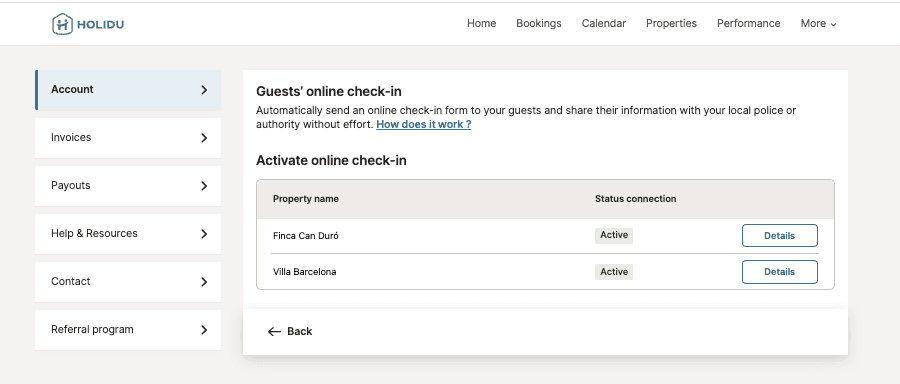
Follow these steps to access and download your guestbook:
- Go to the Online Check-in feature page.
- Next to the property you want the guestbook for, click on "Details".

Frequently asked questions
Why does Holidu offer this feature?
Local law requires hosts to register all guests with local authorities. This tool automates the process, supports legal compliance, and saves you time from manual data entry.
Which authorities can I connect to?
The available authorities depend on your region. You can connect to the specific authority for your country and region. Refer to the setup instructions table above for your location.
Is registration with the authorities mandatory?
Yes, registration is a legal requirement in countries where this feature is available.
Can I use this feature for all types of bookings?
Only bookings created through channels supported by Holidu are eligible. Manual bookings and iCal-based imports are not supported.
Can I send guest data from previous bookings?
No. The online form is only triggered for future bookings. Bookings made before enabling the police connection are not covered. You'll need to register those manually in your authority's portal.
What guest data is collected and sent?
Personal details (name, date of birth, nationality, ID type/number, etc.) are collected. Only minimal required data is visible to you as the host (name, age). Full data is sent securely to authorities.
Will I have access to the guest data?
We only show you the names and age of the guests, which is the required information for the guestbook. We do not display additional information like ID numbers.
What happens if guests provide their information and then cancel the booking?
If the guest cancels their booking, the data won't be sent to the authorities.
Will I receive a notification when guests provide their data?
We don't send notifications. However, you can see whether guests have provided their data for each of their bookings in your account.
Do children need to be registered?
Yes, all guests must be registered regardless of age. For Spanish minors under 14, ID and signature are not required, but the responsible adult's relationship must be recorded.
What happens if guests don't complete the form?
Guests will receive an automatic reminder 5 days before arrival. If still incomplete, you can either manually fill out the form in the presence of the guest or resend the link. Data must be submitted before 23:00 on the check-in day to benefit from the automated connection.
Can I fill out the form for my guests?
Yes, you can fill it out directly from the booking details screen. You can also scan their ID or enter data manually during check-in.
Can I modify data after submission?
No. Once sent to the authority, data cannot be edited. If there's an error, contact Holidu support or re-enter the data manually on your authority's portal directly.
When is the data sent to the authority?
Data is sent automatically at 23:00 on the check-in day. You are responsible for ensuring data is complete before this time.
Do collaborators have access to this feature?
No. Only primary accounts with editor rights can configure connections. Collaborators can see the form in booking details but cannot activate or manage the feature.
What happens if my authority credentials change or expire?
You'll need to manually update them in Holidu. Expired passwords may cause a failed data transfer. Always verify connection status in the "Account" section.
Is the guestbook legally required?
Yes. The guestbook acts as your digital log for police checks and must be retained for 3 years, as per applicable regulations.
Does this work for multi-units?
Yes. The configuration flow works the same way as the existing setup, but multi-unit hosts can configure each unit separately.
Do you want to contact us?
We’re here to help. You can contact us directly if you need assistance or have questions.
Contact us