Learn how to connect your Holidu property to SIBA (Sistema de Informação de Boletins de Alojamento) and automate your guest registration process to comply with Portugal's local registration requirements.
Context: Online Check-in and SIBA Integration
Holidu's online check-in feature enables you to collect guest information automatically and submit it directly to the SIBA portal, streamlining your compliance with Portuguese accommodation registration rules. This integration saves time by automating data collection and transfer, ensuring your guests complete their registration before check-in.
Important: While Holidu facilitates the collection and transfer of guest data, legal compliance remains your responsibility as the host. For comprehensive legal information, consult the official SIBA portal.
1. Before You Start - What Are the Prerequisites?
Before activating the guest registration feature with Holidu, ensure you have the following in place:
- A property already registered on the official SIBA portal: https://siba.ssi.gov.pt
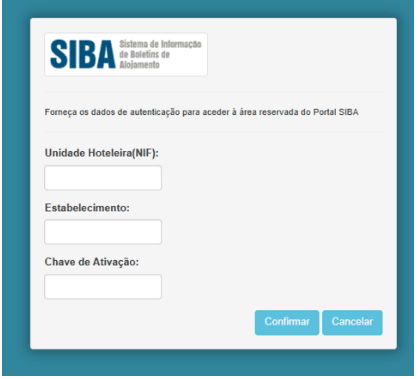
- Your SIBA credentials available:
- NIF of the Hotel Unit
- Establishment Code
- Authentication Key (typically a 12-digit password)
- Knowledge of your active bulletin submission method (Método de envio) in your SIBA account. Both "SEF-SIBA web service integration" and "SEF-SIBA Página no portal integration" can be connected to Holidu, but the method you select in the Holidu app must match the one configured in SIBA.
To check your current submission method:
- Log in to your SEF account at https://siba.ssi.gov.pt/s/an/default.aspx
- Navigate to "Atualização dos dados de inscrição" to view your active submission method
If you need to change the submission method and cannot do it yourself, contact SIBA directly at https://siba.ssi.gov.pt/contactos
2. How to Configure Guest Online Registration Between Holidu and SIBA
Step-by-Step Configuration Process
Step 1: Access the Online Check-in Tool
- In your Holidu app, navigate to "Tools" in the left side menu
- Click on "Online Check-in"

Step 2: Select Your Property
You will see a list of your properties. Click "Configure" next to the property you want to connect to SIBA.
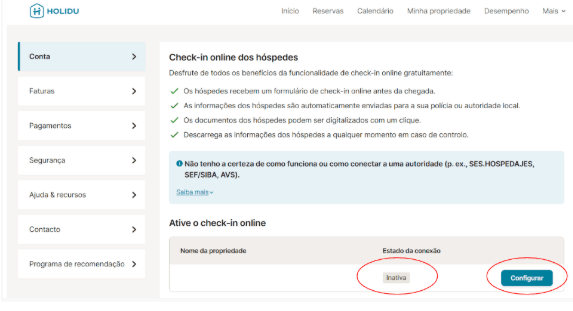
Step 3: Fill in Property Information
Complete the form with your information and credentials from the SIBA portal. Enable the option "Send data automatically to the responsible authority."

Step 4: Select Your Connection Method
For Portugal, there are two possible connection methods, each requiring different fields. Always choose the option that matches the sending method (Método de envio) currently configured in your SIBA account. If the two do not match, validation and data transfer will fail.

Option A: SEF-SIBA Web Service Integration
Use the same credentials that you use to access the SIBA portal at https://siba.ssi.gov.pt/S/FB.aspx?ReturnUrl=%2fS%2fau%2fDefault.aspx
Required login fields:
| Field in Holidu App | SEF/SIBA Portal Field |
|---|---|
| Username | Unidade Hoteleira (NIF of the hotel unit) |
| Password | Chave de Ativação (activation key) |
| Establishment number | Estabelecimento (establishment code) |
For the remaining fields (postal code, postal area, contact name, email, and phone number), enter exactly the same information that appears in your SIBA account under Atualização dos dados de inscrição: https://siba.ssi.gov.pt/S/au/DadosIdentificacaoActualizacao.aspx
On the same SIBA page, the Método de envio must be set to Web Service for this option to work. If it is set to something else, follow the switching instructions below.
Option B: SEF-SIBA Página no Portal Integration
Use the same credentials that you use to access the SIBA portal at https://siba.ssi.gov.pt/S/FB.aspx?ReturnUrl=%2fS%2fau%2fDefault.aspx
Required fields:
| Field in Holidu App | SEF/SIBA Portal Field |
|---|---|
| Username | Unidade Hoteleira (NIF) |
| Password | Chave de Ativação (activation key) |
| Establishment number | Estabelecimento (establishment code) |
No address or contact details (postal code, postal area, contact name, email, phone number) are needed for this option—only the three fields above.
Select "Página no portal" only if this is the sending method configured in your SIBA account settings. You can verify it under Atualização dos dados de inscrição in the SIBA portal.
How to Switch Between the Two Methods
The sending method selected in the Holidu app must always match the Método de envio in your SIBA account. Changing it in Holidu alone is not sufficient—the change must be requested from SIBA.
- Check the current method in the SIBA portal under Atualização dos dados de inscrição: https://siba.ssi.gov.pt/S/au/DadosIdentificacaoActualizacao.aspx
- If it is not the method you want, collect your NIF/Tax Identification Number (your company or host tax number) and the establishment number(s) of every property that needs to be changed
- Send an email to siba@ssi.gov.pt requesting the change of submission method (for example, to Web Service)
- Wait for SIBA's confirmation that the change has been processed
- Once confirmed, return to the configuration form in your Holidu app, select the matching sending method, complete the required fields for that option, and validate again
Step 5: Validate and Save
- Click "Validate"
- Once it shows "Completed!", click "Save Changes"
- You will see confirmation that the connection is now active

3. What Happens After Activation
After you successfully activate SIBA integration with Holidu, your future bookings will automatically be associated with a check-in form. The integration applies to bookings with a check-in date at least 6 days after the configuration is completed.
The check-in form is automatically sent to guests via email or through the booking platform message system. Guests must complete this form with details for all guests in their party, including children. This automated process helps ensure compliance and reduces manual administrative work.
4. Guest's Point of View
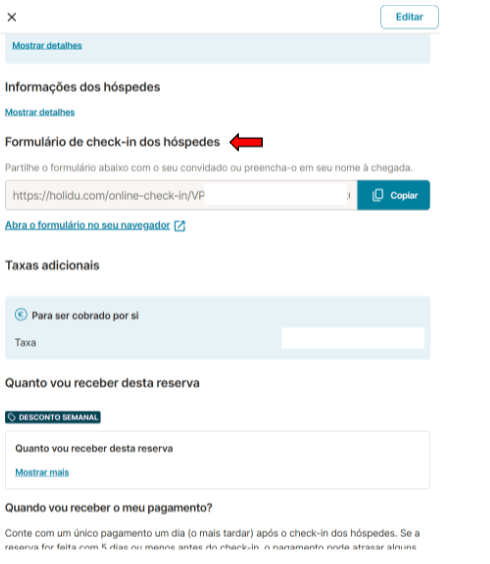
Understanding the guest experience ensures smooth completion of the registration process. Here is what happens from your guests' perspective:
After Booking:
Guests receive a form link via email or through the booking platform message. They must fill out details for all guests staying at the property, including children. Guests can complete the form manually by typing information or by scanning their ID documents using their phone camera.


Before Check-in:
Once guests submit their information, it is stored in the system. If guests do not complete the form, automatic reminders are sent 5 days prior to the check-in date. If the form remains incomplete by check-in day, you can collect the information manually using the same form link.
On Check-in Day:
After 11:00 PM on the check-in date, all completed guest data is automatically sent to the SIBA portal. Ensure all guest information is completed by this time for successful transfer to the authorities.
5. Form Statuses
As you manage your bookings in the Holidu app, you will see various form statuses on each booking page. Understanding these statuses helps you track the progress of guest registration and identify any issues that need attention.
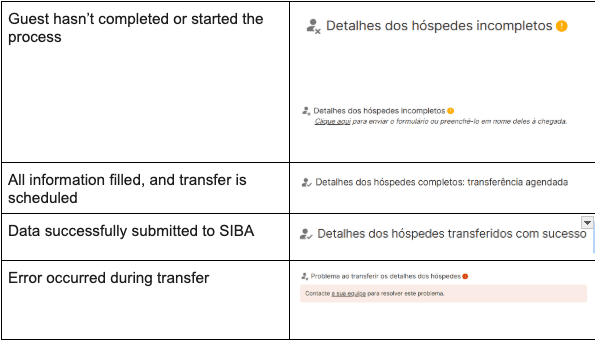
Common Form Statuses:
- Pending: The form has been sent to guests but has not yet been completed
- Completed: All guest information has been filled out and submitted
- Submitted to SIBA: The data has been successfully transferred to the SIBA portal
- Transfer Error: There was a problem sending the data to SIBA
- Incomplete: Some required fields are missing from the guest information
How to Fix Incomplete or Failed Data:
- Resend the form link to the guest as a reminder through the Holidu app or email
- For transfer errors:
- Contact Holidu Support at host@holidu.com
- Confirm that the sending method selected in the Holidu app matches the submission method (Método de envio) configured in SIBA, either "SEF-SIBA web service integration" or "SEF-SIBA Página no portal integration"
- Verify that your SIBA credentials are still valid and have not expired
6. How to Get the Guest Registration Form - Boletim de Alojamento
You can download a copy of the guest registration form (Boletim de Alojamento) for your records or for offline use. This is useful if you need to manually collect information from guests or keep a backup of registration forms.
Steps to Download the Form:
- Log in to your Holidu account and navigate to More > Account > Guest Online Registration
- Click Configure next to your property
- Open the Details > Documents section
- Select Generate Guest Form
- Choose the date period for the form you need
- Click Download to save the form to your device
Do you want to contact us?
We’re here to help. You can contact us directly if you need assistance or have questions.
Contact us