Learn everything about how to connect to SIBA and integrate it with Holidu for seamless online guest registration and compliance with Portugal's local registration requirements.
Context: What is SIBA and Why Connect It to Holidu?
SIBA (Sistema de Informação de Boletins de Alojamento) is Portugal's official guest registration system managed by the State Secretariat for Internal Affairs (SEF). By connecting SIBA to your Holidu property, you can automatically collect guest information and submit it to the authorities, ensuring compliance with local regulations. This integration streamlines your check-in process and reduces manual data entry.
Important Note: While Holidu facilitates the collection and transfer of guest data, legal compliance with registration requirements remains your responsibility as the host. For detailed legal information, consult the official SIBA portal at https://siba.ssi.gov.pt.
1. Before You Start – What Are the Prerequisites?
Before activating the guest registration feature, ensure you have the following in place:
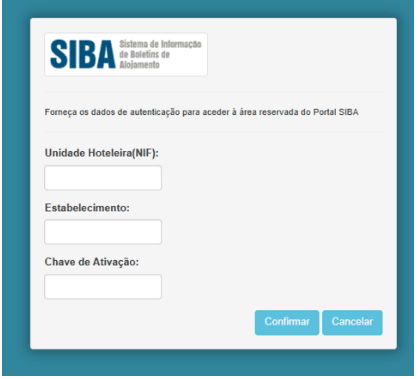
- Active SIBA Portal Account: You must already have a property registered on the official SIBA portal at https://siba.ssi.gov.pt
- SIBA Credentials: Have the following information available from your SIBA account:
- NIF (Tax Identification Number) of the Hotel Unit
- Establishment Code
- Authentication Key (typically a 12-digit password)
- Correct Submission Method: Ensure your SIBA portal is configured to use "SEF-SIBA web service integration" as the submission method
If your submission method is currently set to a different option, follow these steps to change it:
- Log in to your SEF account at https://siba.ssi.gov.pt/s/an/default.aspx
- Navigate to the submission method settings and change it to Web Service
- Update the field "Automatically send info to" to "SEF-SIBA web service integration" in your account settings
If you cannot make this change yourself, contact SIBA support directly at https://siba.ssi.gov.pt/contactos to request the modification.
2. How to Configure Guest Online Registration Between Holidu and SIBA
Follow these step-by-step instructions to connect your Holidu property with your SIBA account:
Step 1: Access the Online Check-in Tool
In your Holidu host app, navigate to Tools in the left-side menu, then click on Online Check-in.

Step 2: Select Your Property
You will see a list of your properties. Click the Configure button next to the property you wish to connect with SIBA.
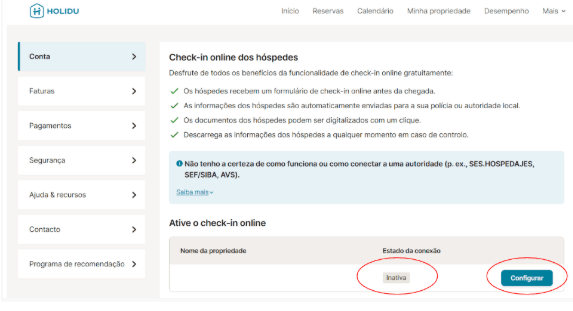
Step 3: Fill in Your SIBA Information
In the configuration form, enter the following information from your SIBA account:
- NIF (Tax Identification Number) of your accommodation unit
- Establishment Code
- Authentication Key (12-digit password)
Enable the toggle for Send data automatically to the responsible authority to activate automatic submissions.

Step 4: Select Integration Method
Choose SEF-SIBA web service integration as your submission method. Enter your NIF (also called Hotel NIF), Password (Authentication Key), and Establishment number in the corresponding fields.

Step 5: Validate and Save
Click the Validate button to test your connection with SIBA. Once the system confirms the connection is valid and shows "Completed!", click Save Changes to finalize the configuration.

Congratulations! Your SIBA integration is now active and ready to use.
3. What Happens After Activation
Once you have successfully configured the SIBA integration, the system begins collecting guest information automatically. Here's what to expect:
Timing of Form Distribution
Guest registration forms are automatically associated with future bookings that have a check-in date at least 6 days after your configuration is completed. Bookings made before this 6-day window will not automatically receive the form; you will need to manually collect and submit guest data for those reservations.
Guest Notification Process
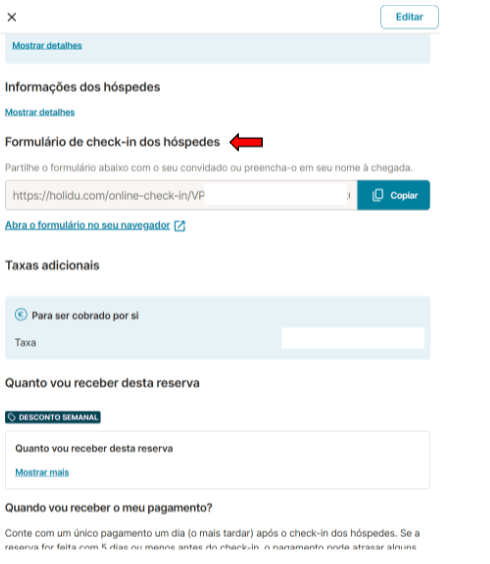
After a guest makes a booking, they automatically receive an email (or message through your booking channel) containing a link to the online check-in form. Guests are encouraged to complete this form as soon as possible.
Data Collection Timeline
The guest data collection process follows this timeline:
- After booking: Form link sent to guest via email or message
- 5 days before check-in: Automated reminder sent if form is incomplete
- On check-in day: Host can manually collect data if still incomplete
- After 11:00 PM on check-in day: All completed data is automatically sent to the SIBA portal
4. Guest's Point of View
Understanding how guests experience the registration process helps you guide them effectively. Here's what guests encounter when filling out their information:
Receiving the Form
After completing their booking on Holidu or your connected platform, guests receive an email with a direct link to the online check-in form. The email includes clear instructions on what information they need to provide.
Filling Out Guest Details
Guests must complete the form with details for all occupants, including children and minors. The form collects essential information such as:
- Full names of all guests
- Date of birth
- Nationality
- Document type and number (passport, ID card, etc.)

Document Scanning Option
To make the process easier, guests can scan or upload photos of their identity documents (passport, ID card, or driver's license). The system automatically extracts the relevant information and pre-fills the form fields.

Form Submission and Confirmation
Once guests complete and submit the form, they receive a confirmation message indicating their information has been received and will be processed.

Reminders for Incomplete Forms
If guests do not complete the form within the initial timeframe, they automatically receive a reminder email 5 days before their check-in date. If the form remains incomplete by the check-in date, you as the host will need to manually collect the information using the same form link or by direct contact with your guests.
5. Form Statuses
In your Holidu app, each booking displays a status indicator for the guest registration form. Understanding these statuses helps you track completion and identify any issues that need attention.
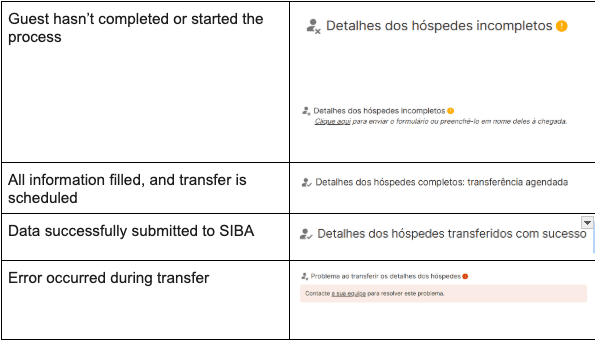
Common Form Statuses Explained
Pending
The form has been sent to the guest, but they have not yet begun filling it out. The guest has until check-in day to complete the form.
In Progress
The guest has started filling out the form but has not yet submitted it. You can see a partial completion indicator showing which fields have been completed.
Incomplete
The guest has submitted the form, but some required fields are missing or contain errors. You will need to follow up with the guest to complete the missing information before the 11:00 PM check-in deadline.
Complete
All required information has been filled in correctly. The form is ready for submission to SIBA.
Submitted
The guest data has been successfully transferred to the SIBA portal. No further action is needed for this booking.
Transfer Error
The form was completed, but there was a technical issue during the submission to SIBA. This requires immediate attention to ensure compliance.
How to Fix Incomplete or Error Data
For Incomplete Forms
- Contact your guest directly with the form link
- Ask them to complete the missing information
- Ensure submission occurs before 11:00 PM on the check-in date
- Alternatively, you can access the link and fill in the missing details on their behalf
For Transfer Errors
- First, verify that your SIBA portal submission method is set to "SEF-SIBA web service integration"
- Check that all your SIBA credentials (NIF, Establishment Code, Authentication Key) are correctly entered in your Holidu configuration
- If the error persists, contact Holidu Support at host@holidu.com with your booking details and the error message
- Holidu's support team can investigate the technical issue and resubmit your data if necessary
6. How to Get the Guest Registration Form – Boletim de Alojamento
If you need to generate a standalone copy of the guest registration form (known as the Boletim de Alojamento in Portuguese) for manual use or record-keeping, follow these steps:
Step 1: Access Account Settings
Log in to your Holidu account and navigate to More in the menu, then select Account.
Step 2: Go to Guest Online Registration
In your account settings, find and click on Guest Online Registration.
Step 3: Access Configuration Details
Click Configure next to your property, then select Details to expand the configuration options.
Step 4: Access Documents Section
Within the Details section, click on Documents to view available forms and generate new ones.

Step 5: Generate and Download the Form
Click Generate Guest Form, select the date period for which you want to generate forms, and then click Download. The form will be saved as a PDF file that you can print or share with guests.

These forms can be used for manual data collection if guests do not complete the online form or for your record-keeping purposes.
Frequently Asked Questions
When do guests receive the form?
Guests automatically receive the online check-in form link via email immediately after completing their booking. If the form remains incomplete 5 days before their arrival date, they receive an automated reminder. The deadline for completion is 11:00 PM on the check-in date.
What about multi-unit properties?
The guest online registration feature is not yet available for properties with multiple units, such as buildings with separately rented rooms or apartments. Holidu is actively developing this functionality and plans to make it available for multi-unit properties in the future. Please check back for updates or contact Holidu Support for the latest timeline.
What happens to bookings made
Do you want to contact us?
We’re here to help. You can contact us directly if you need assistance or have questions.
Contact us